A complete digital system for your café, restaurant or pizzeria
A website, a QR menu on every table, orders and waiter calls, bookings confirmed on WhatsApp, staff rotas and delivery with driver tracking. All on your own domain, in one admin panel, for a monthly subscription.
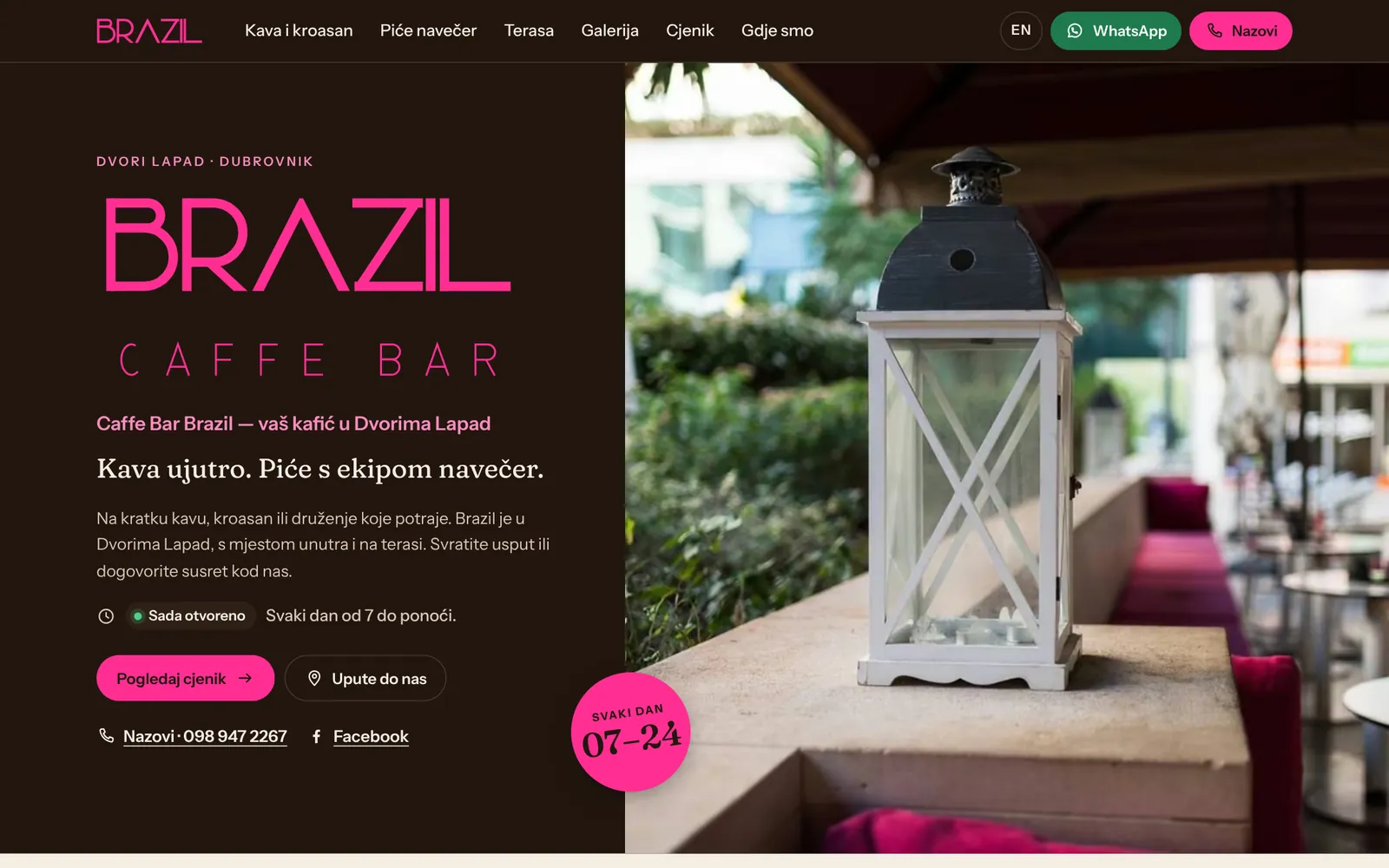
Pilot project: Caffe Bar Brazil, Dvori Lapad, Dubrovnik
a month for the website, QR menu and reservations
€69
a month with table ordering and a bar admin
€125
a month with delivery and live driver tracking
€179
from your menu and photos to a working system
10 days
What still gets done by hand
Small things that eat an hour a day in season, right when it's busiest.
A menu with crossed-out prices
The menu gets printed once a year, and prices change more often. The table ends up with paper and a biro.
Staff running to every call
One table wants to order, another wants the bill, a third asks about gluten-free. The waiter is always on the move, and the order waits.
Delivery through someone else's platform
The platform brings orders, but takes a cut of each and keeps your guests' details. Regulars order through them, not from you.
Choose your package
All packages come with a website on your domain, a Google Business Profile and SEO. What changes is the toolset for your venue and delivery. Grow, and you can move up a package.
Start
€69/mo
For cafés and smaller restaurants that want a good website and more guests from Google.
Website on your domain, info@ email, hosting and HTTPS
Up to three languages
Menu on the website and a QR menu for tables
Bookings confirmed on WhatsApp
Google Business Profile: setup, editing and one post a month
SEO: local and technical SEO, descriptions and page structure
Prices are per month, and you pay nothing until you’ve approved the launch. Google Ads, hardware and card payment fees aren’t included. Billing starts only after a launch you approve. 12 months minimum, then 30 days’ notice. Pay a year upfront and you pay for 10 months. Subscription terms
What you get
These are all the tools in the System and System with delivery packages. Start includes the website, QR menu, bookings, Google profile and SEO.
A website on your domain
Menu, gallery, opening hours, map and contact in up to three languages. Domain, info@ email, hosting, HTTPS and maintenance are included.
QR menu and table ordering
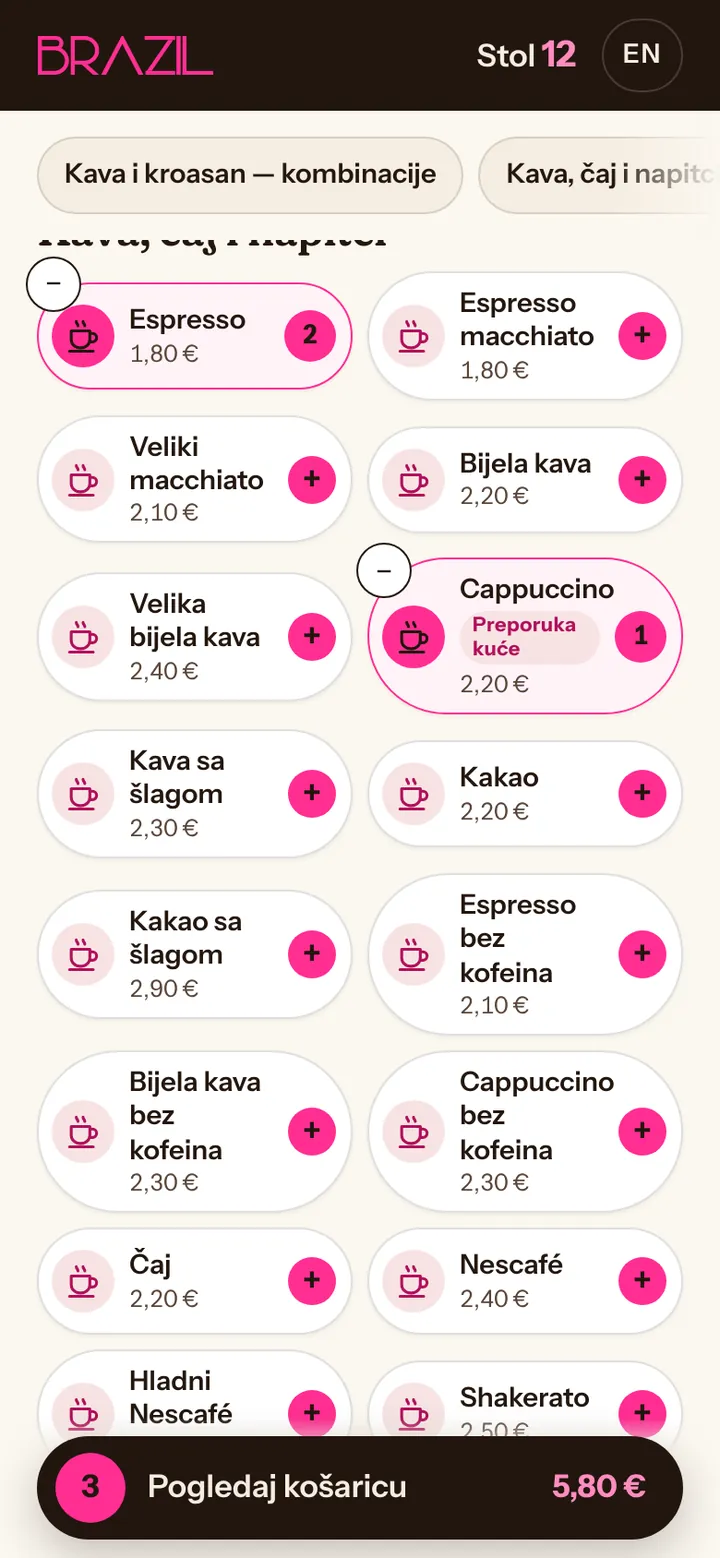
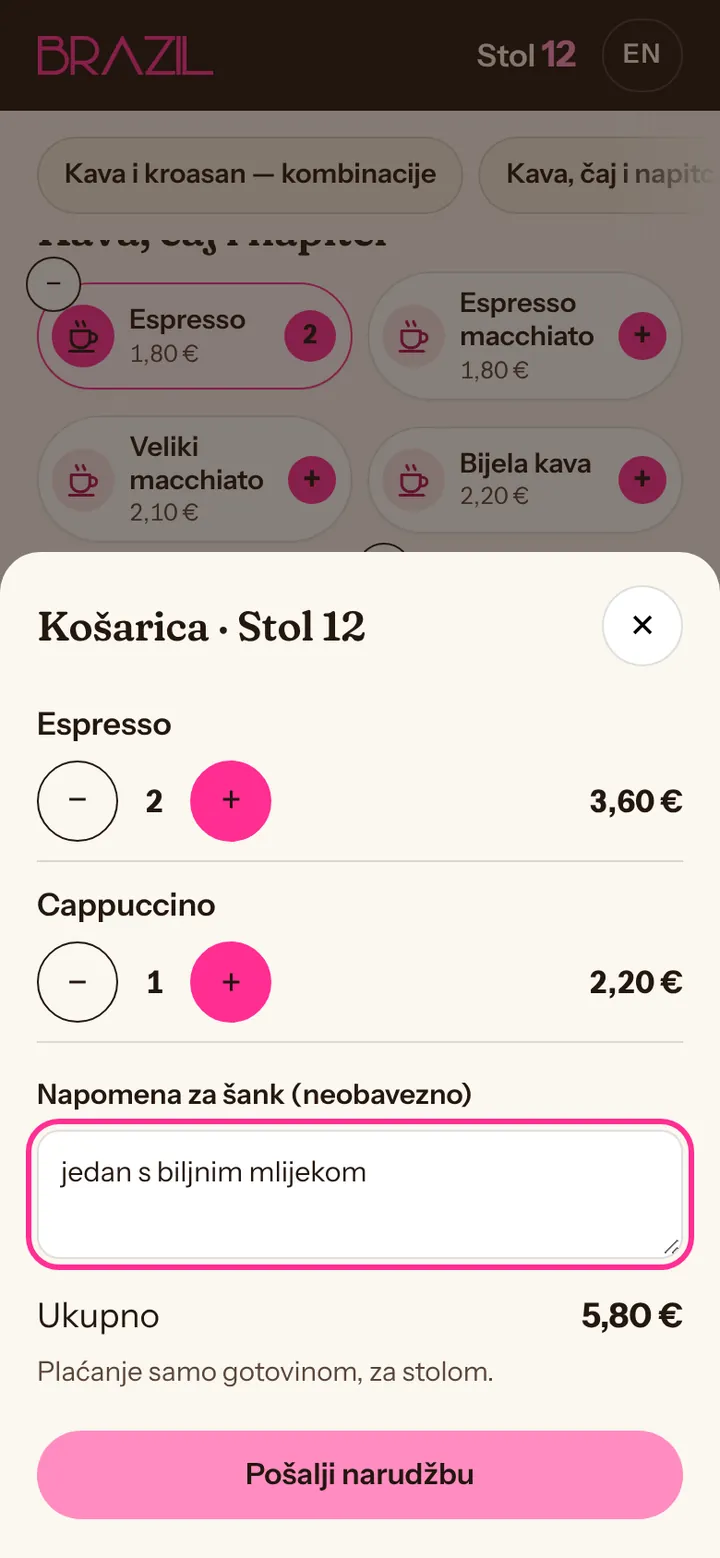
Every table has its own QR code. Guests scan, pick drinks or dishes, send the order and follow its status. No app to install.
Call a waiter and the bill
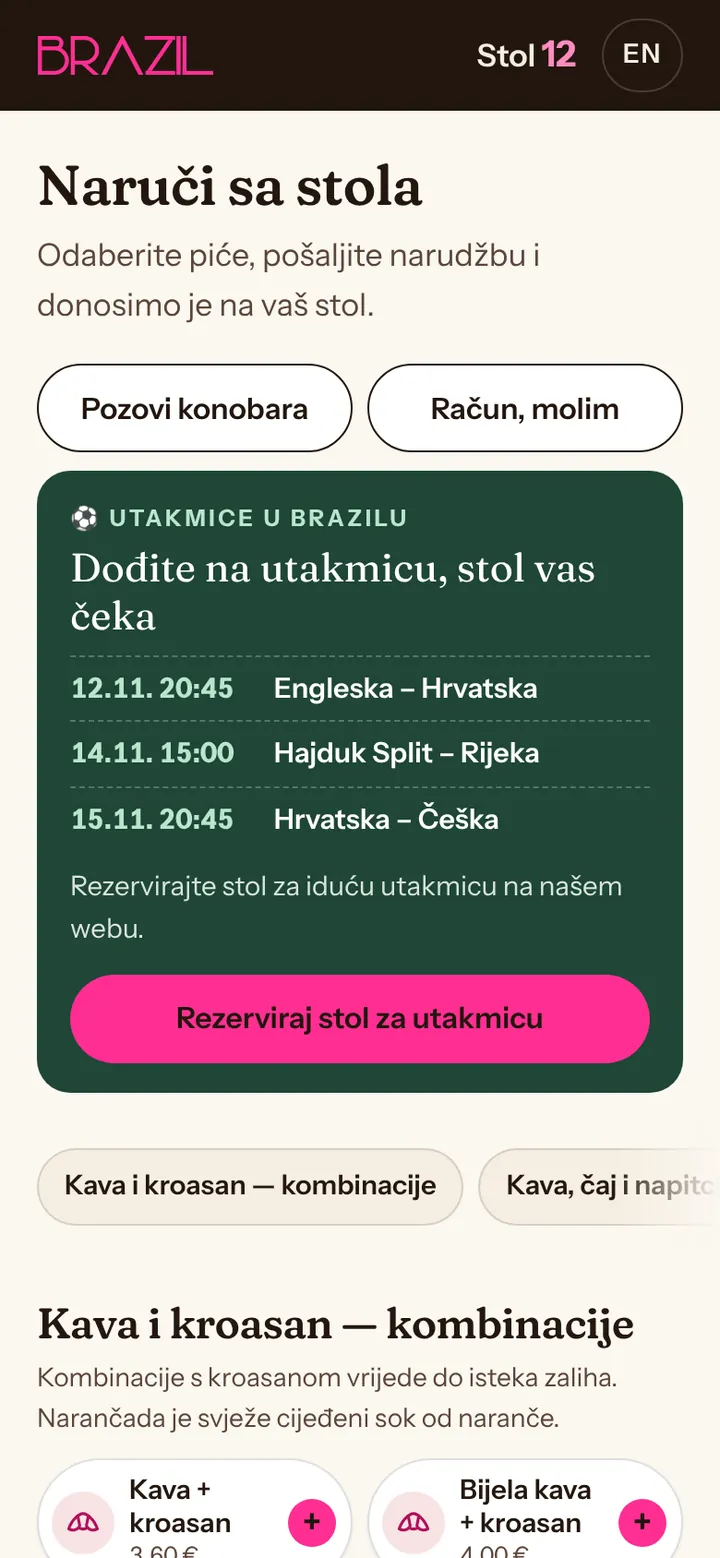
The table page has two buttons: call the waiter, ask for the bill. Behind the bar, table 7 lights up with a ping. No more waving across the terrace.
Bookings confirmed on WhatsApp
A form with required details and the country dialling code. One click confirms and sends the guest a WhatsApp message in their language, plus a reminder the day before.
Floor plan
Bookings are linked to tables. For any day and time you see which tables are taken, where an order is in progress and who wants the bill.
Items and labels
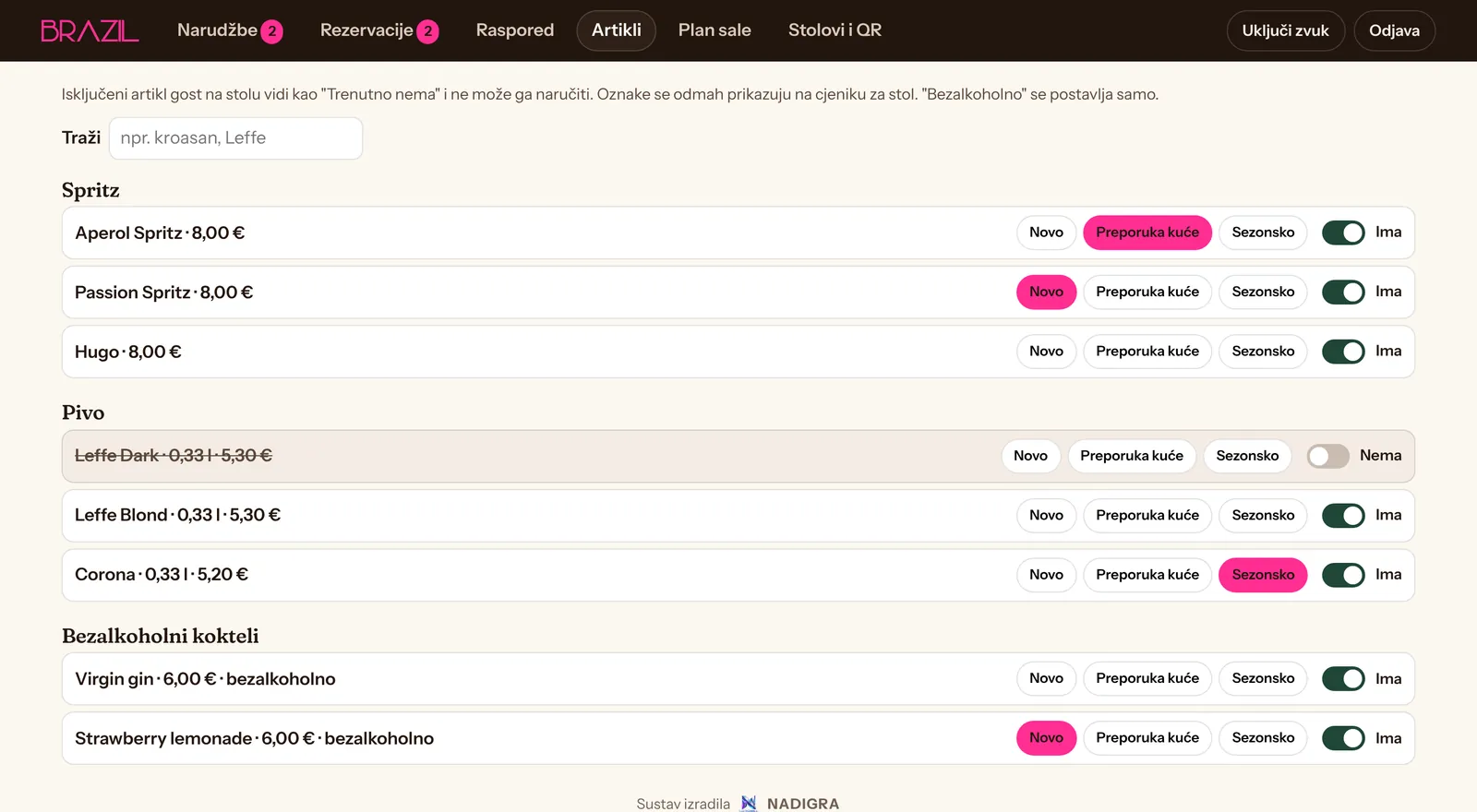
When something runs out, switch it off with one click and guests cannot order it. New, House favourite, Seasonal and Alcohol-free labels show at once.
Staff rota
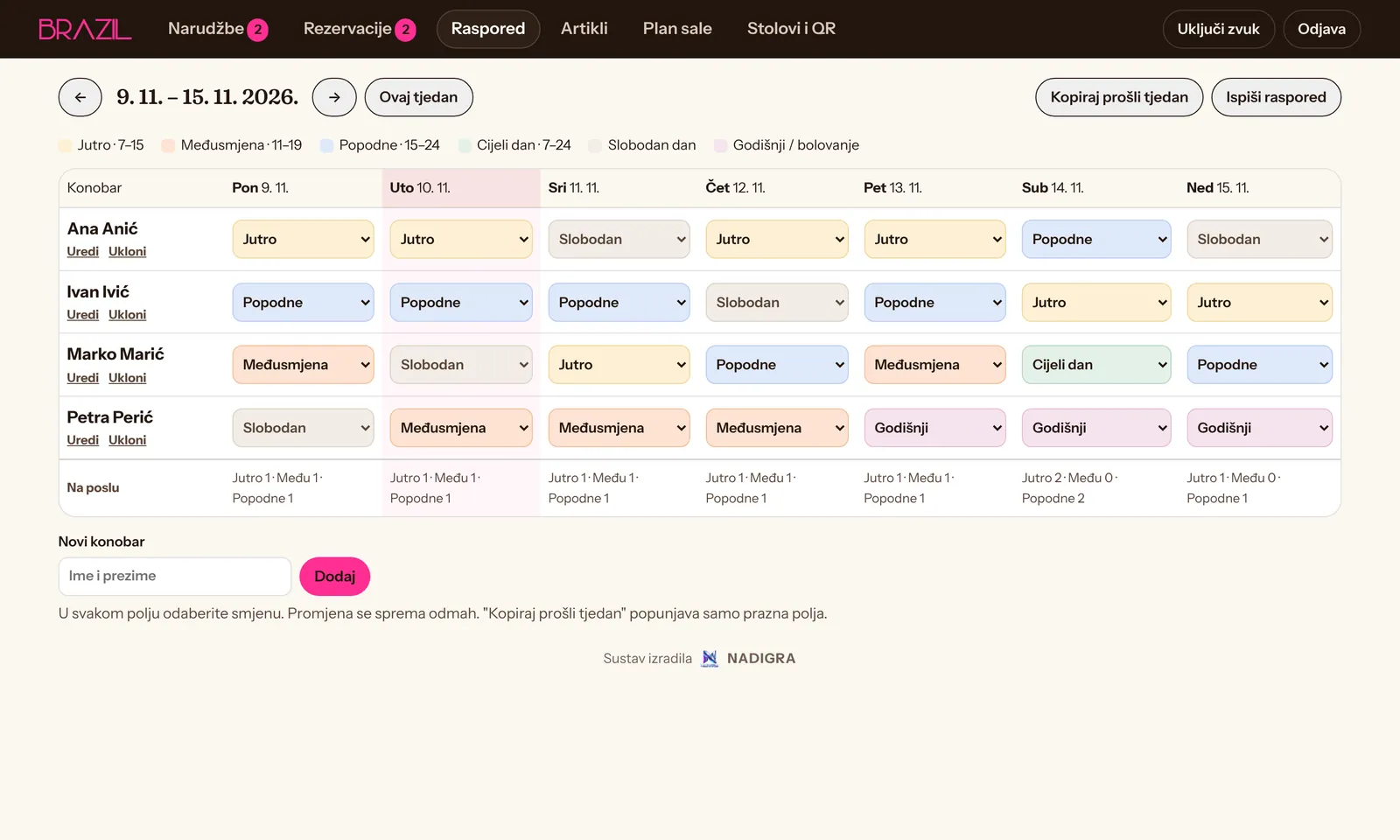
A weekly shift table: morning, mid shift, afternoon, day off, holiday. Day by day on a phone, with a warning when a shift has nobody.
Printing at the bar and kitchen
New orders print by themselves on an 80 mm thermal printer, with the table number, items and note. For rush hours when nobody can watch the screen.
Match schedule
Sports bars get a match list that fills itself in. Derby on Saturday? It’s already there, with a button to book a table for it.
Google profile, SEO and blog
A tidy Google Business Profile, posts for events, review replies by agreement and one blog post a month. Guest reviews on your website.
Legal pages and privacy
Privacy policy, cookies and legal notice in Croatian and English, written for what the system actually does. Personal data is deleted automatically.
Admin on phone and computer
One admin for the bar, the waiters and the owner. Log in with a password, hear a ping for every new order, use it on a tablet, phone or laptop.
A real project
What it looks like in practice
Screenshots from the pilot project for Caffe Bar Brazil in Dubrovnik, with sample data instead of real guests.
For guests
Scan the code on the table and order
Guests see the menu as tidy buttons with icons and prices. They tap what they want, add “no ice” for the bar and send. It picks up the language from their phone.
No app and no sign-up
The code works only for that table
Order status: received, being prepared, served
For the bar
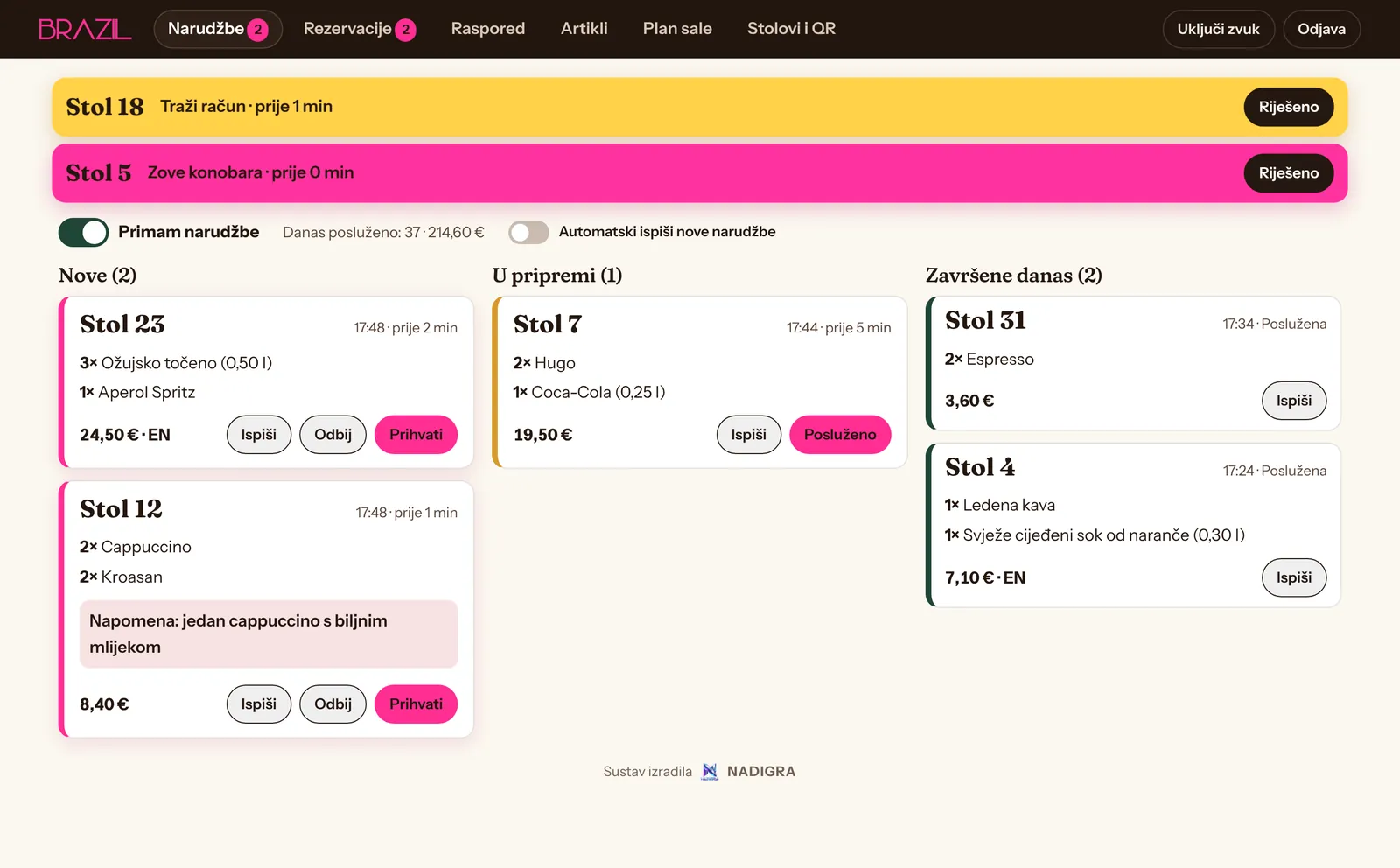
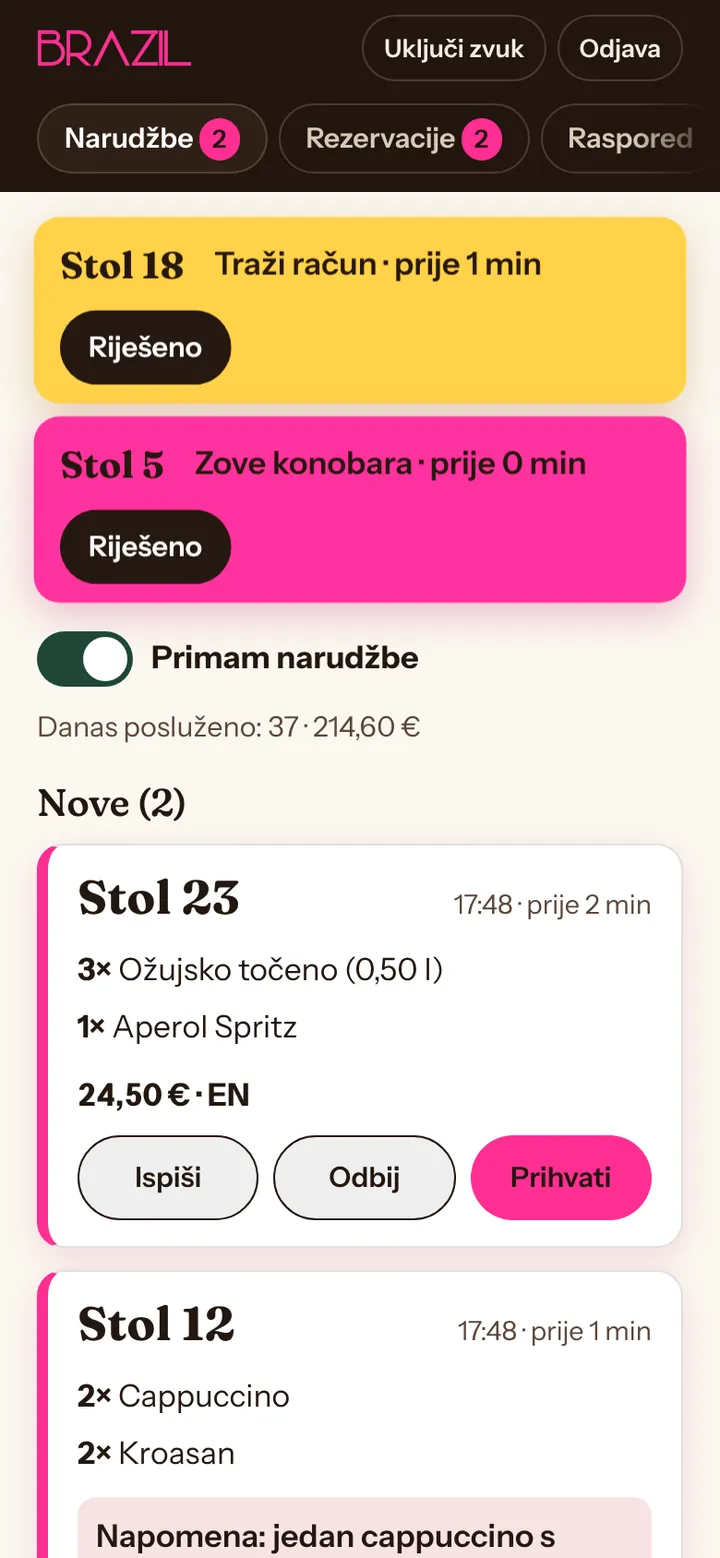
Orders and calls arrive on one screen
New orders, those being prepared and those finished today, each with a table number. Waiter calls and bill requests light up at the top until someone deals with them.
A sound and vibration for every new order
Accept, Served or Decline with one tap
The day's takings in the same view
brazildvori.com/admin
Bookings
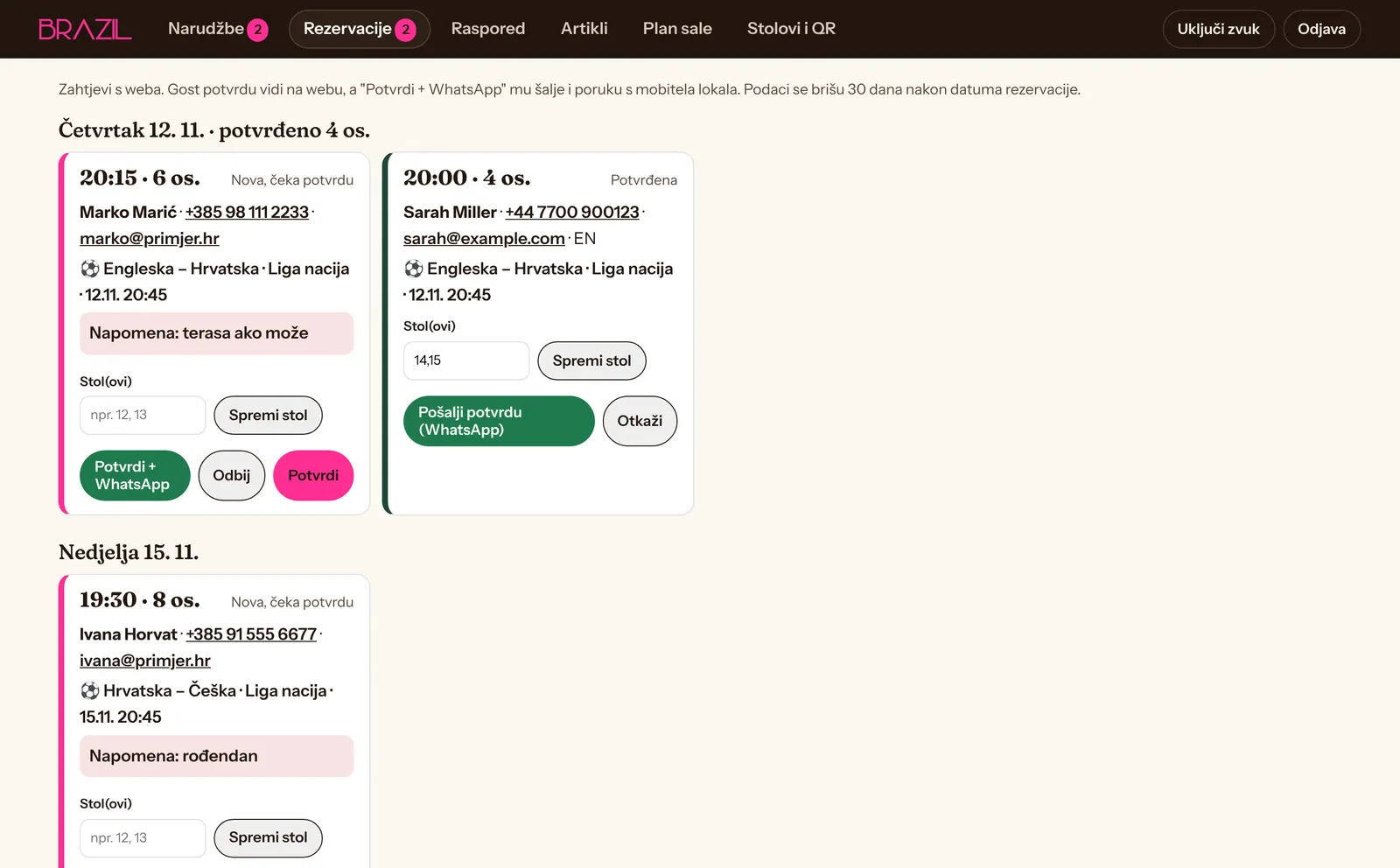
A request from the website, confirmed on WhatsApp
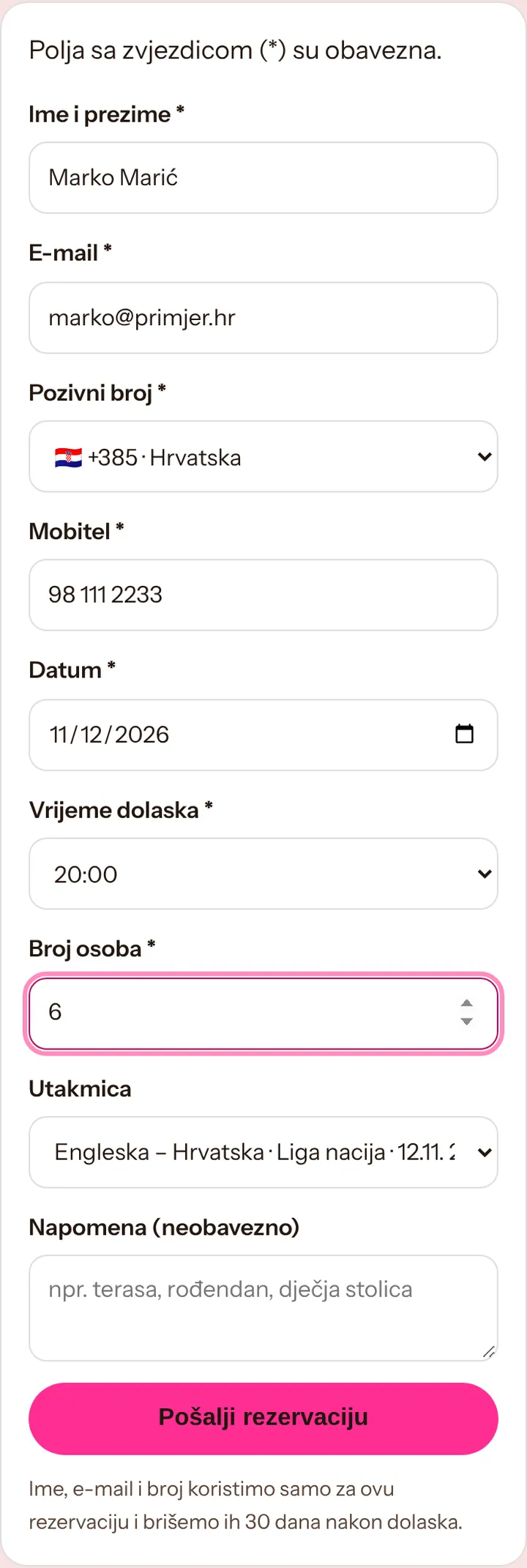
Guests leave their full name, email, mobile number with dialling code, date, time and party size, and for sports bars the match. You confirm and send a message in their language with one click.
Confirm, decline and remind the day before
Tables are assigned to bookings
Data is deleted 30 days after the date
brazildvori.com/admin
Floor plan
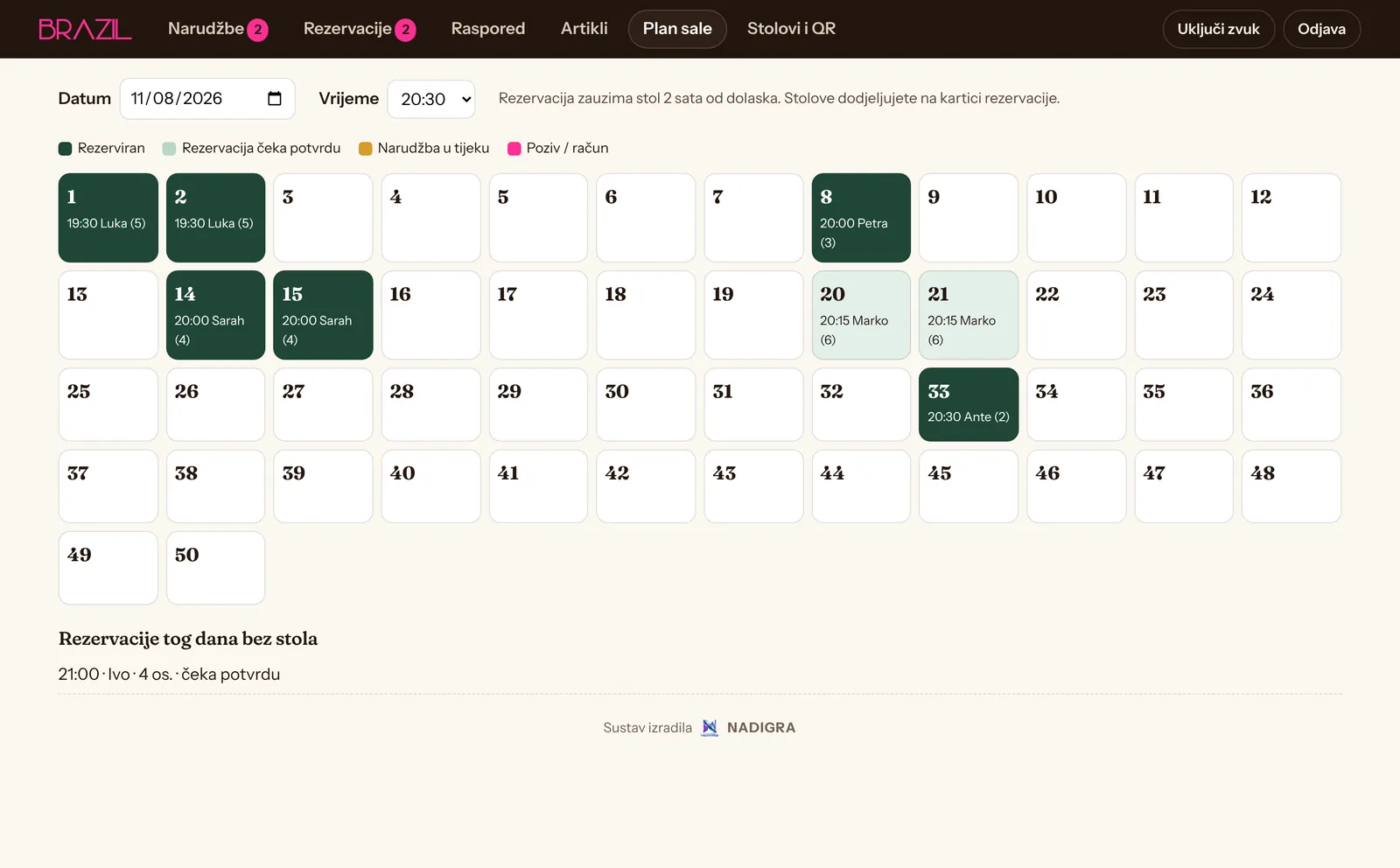
Which table is free at 8:30 pm?
For the selected day and time you see booked tables, those awaiting confirmation and bookings without a table yet. Today you also see orders in progress and calls.
A booking holds a table for two hours
View by day and time
Tables by number, or by your floor sketch on request
brazildvori.com/admin
Staff
Shift rota without paper
The owner enters the week's shifts and waiters see them on their phones. Last week copies with one click, and the table prints for the notice board.
Morning, mid shift, afternoon, day off, holiday
A warning when a shift has nobody
Day by day on a phone
brazildvori.com/admin
Menu
Sold out? One click
Guests see a sold-out item as Not available right now and cannot order it. You add New, House favourite and Seasonal labels the same way.
Search by name
Labels show at once on the QR menu
The menu stays tidy on the website too
brazildvori.com/admin
Tables
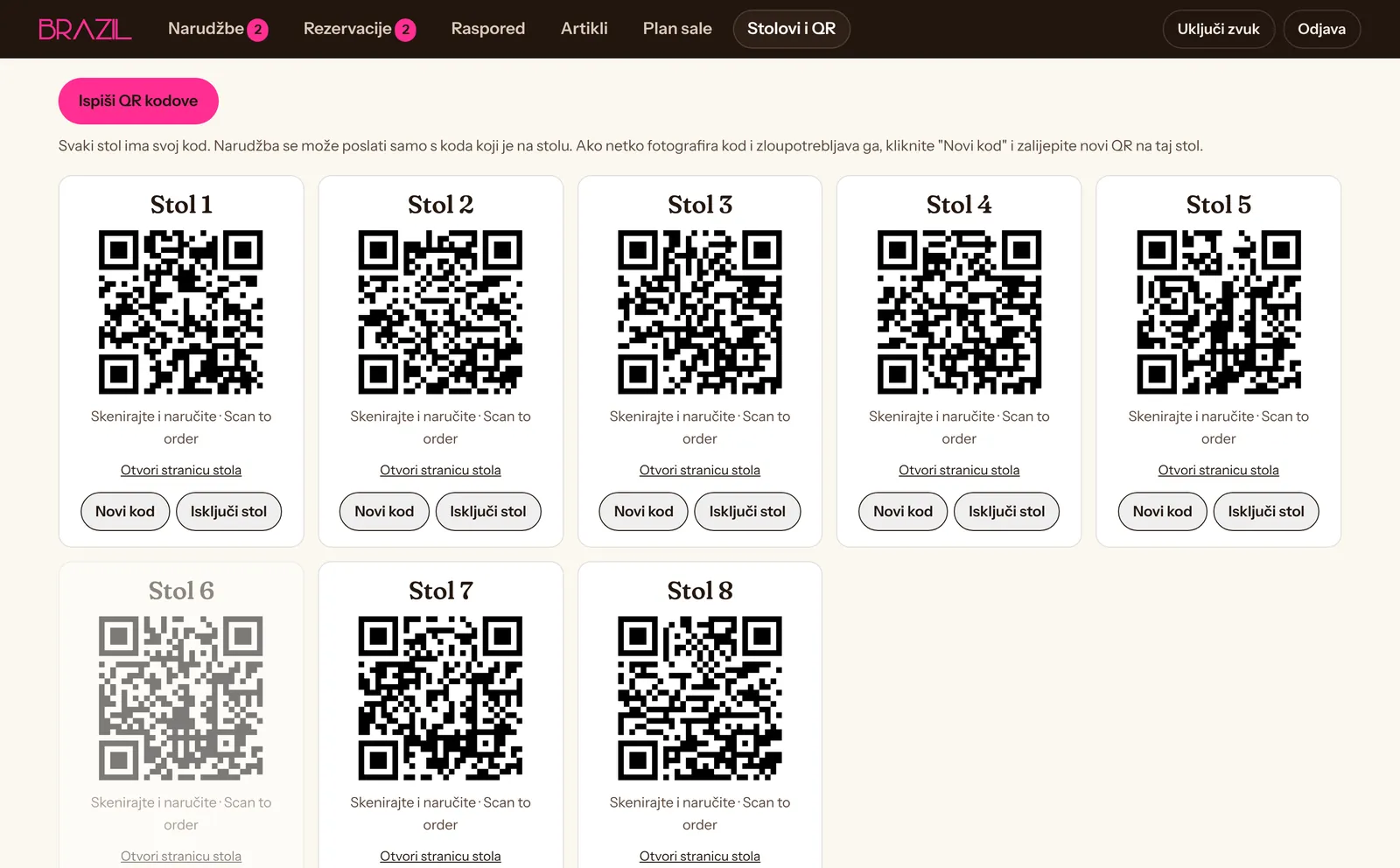
Every table has its own QR code
Print the codes straight from the admin, two to a row, table number included. If someone abuses a code, make a new one for that table and the old one dies.
Orders only from the code on the table
Switch off a single table
Ready to laminate
brazildvori.com/admin
FOR RESTAURANTS AND PIZZERIAS THAT DELIVER
Your own delivery: order, kitchen, driver and tracking
Orders come through your own website, not someone else’s app. The kitchen gets it, you give it to a driver, and the guest watches a little dot bring their pizza down the street.
1
The guest orders
A menu with photos and extras, a basket, an address with a map pin, a note and payment method. Pick-up at the restaurant works too.
2
The kitchen accepts
Ping, and the printer starts rattling. You accept the order, type “25 min”, and the guest’s phone shows the confirmation before you’ve put the ticket on the rail.
3
Preparing
The guest sees Being prepared as well. When it’s ready, one click hands it to a driver.
4
On the way
The driver taps the address and navigation opens. While they drive, the guest sees them on the map, so nobody has to call and ask where the food is.
5
Delivered
Driver taps Delivered, order closed. A bit later the guest can get a friendly message asking for a Google review, while the pizza is still warm in their memory.
ILLUSTRATION · GUEST VIEW
Order #128On the way
Received
Preparing
On the way · 9 min
Delivered
Driver app
Runs in the phone browser, nothing to install. Assigned orders, a call button, navigation and Picked up and Delivered buttons.
Live tracking
During the ride, both the guest and the restaurant can see the driver on a map. The moment the delivery ends, location sharing stops. Nothing is kept.
Zones, minimum and delivery fee
Delivery areas, a minimum order and a fee per zone. The system does not accept orders outside the zone.
Pause for rush hours
One switch pauses delivery orders for a while or extends the estimated time.
Payment
Cash or card on delivery. Online card payment is connected by agreement, through a provider you choose.
Delivery overview
How many orders, the average delivery time and takings per day, with no per-order platform commission.
We set up the delivery module around how you work: zones, extras, delivery hours and the number of drivers are agreed before we build.
Why it pays off
Guests
Order when they want, without waiting for a waiter
The menu in their language, on their own phone
Book a table for a match or a birthday in a minute
Follow their order and delivery
Staff
Less walking: the table calls when it needs something
Orders with table number and note, no mishearing
Printing at the bar and in the kitchen
The rota always on their phone
Owners
More orders per table, especially when busy
Your own delivery channel, with no per-order platform commission
Tidy bookings and a floor plan
A stronger Google profile and more reviews
Who it is for
Cafés and coffee bars
Sports bars
Restaurants and taverns
Pizzerias with delivery
Beach bars
Bistros and fast food
How it works
A conversation
Send us your menu, photos and how you work: number of tables, bookings, delivery.
Built in 10 days
Website, QR menu, admin and legal pages on your domain. You review everything before launch.
QR codes and training
We print the table codes and show your staff how it works in half an hour.
Launch and support
After launch we follow the first days, and menu and price changes are part of the subscription.
Included in every package
Domain, info@ email, hosting and HTTPS
Website and QR menu in up to three languages
Google Business Profile
SEO
Bookings confirmed on WhatsApp
Maintenance and menu changes
MCP server for AI assistants
Not included
Hardware: tablet, printer and table stickers
Google Ads budget
Online card payment provider fees
SMS messages, if you want them instead of WhatsApp
Pilot project
Pilot: Caffe Bar Brazil, Dubrovnik
The system runs at Caffe Bar Brazil in Dvori Lapad: website, QR ordering on 50 tables, match bookings, staff rota and an admin at the bar.
Tell us whether you run a café, restaurant or pizzeria and what you need: a website, QR menu, table ordering or your own delivery system. A short message is enough to get started.
Questions from restaurant owners
What café and restaurant owners ask us before the first conversation.
No. Guests scan the QR on the table or open the website and it all runs in the phone’s browser. Drivers too. Nobody installs anything.
Can someone order for another table?
No. Each table has its own code in its QR, and orders only go through from that table’s code. You can swap the code in the admin any time.
What if we are too busy to watch orders?
Orders can print by themselves at the bar, and QR ordering can be paused with one switch.
Is delivery included in the price?
Delivery is part of the System with delivery package, €179 a month: online orders, a driver app and delivery tracking. Online card payment is connected by agreement.
What do the Google profile and SEO include?
We set up and edit your Google Business Profile: categories, description, opening hours, photos and posts. SEO covers local and technical SEO, titles, descriptions and page structure so guests find you more easily when they search for a café or restaurant nearby. We cannot guarantee rankings.
How is the driver tracked?
Only while the delivery is on. The driver starts it on their phone, the guest and the restaurant see them on the map, and when it’s delivered the location sharing switches off and nothing is stored.
How are bookings confirmed?
The booking lands in the admin. One click to confirm, and WhatsApp opens with a message to the guest already written in their language. You can nudge them with a reminder the day before, too.
How long does it take?
Send us your menu and photos and the site and system are ready within 10 days. You pay nothing until you’ve approved the launch.
Is Google Ads included?
No. Advertising is agreed separately, with a separate ad budget.
Can I change my package later?
Yes. Start small, and when you’re ready for table ordering or delivery we add it to the site you already have. Same site, same address, more tools.
Do I need special hardware?
No. The admin runs on the phone, tablet or computer you already have. A printer at the bar is optional, and equipment isn't included in the price.
Can I change prices and items myself?
In the Start package, we make menu changes on request. In System, you switch items on and off and label them yourself in the admin.
Which languages is the menu in?
Up to three languages are included, usually Croatian, English and German. You choose based on the guests you get.
I already have a website. What then?
Send us the link. We'll look at what you have and suggest whether to rework it or build the new system on your domain.
How long is the contract?
At least 12 months from launch, and you start paying only once you approve the launch. After that, notice is 30 days. A year upfront costs 10 months.
Show us your place
Message us on WhatsApp or send an enquiry. Tell us what kind of place it is, how many tables you have and whether you deliver.
We use necessary storage to run the website. With your consent we also measure visits (analytics) and the results of our Google ads. You can change your choice at any time under Cookie settings in the footer. Cookie policy